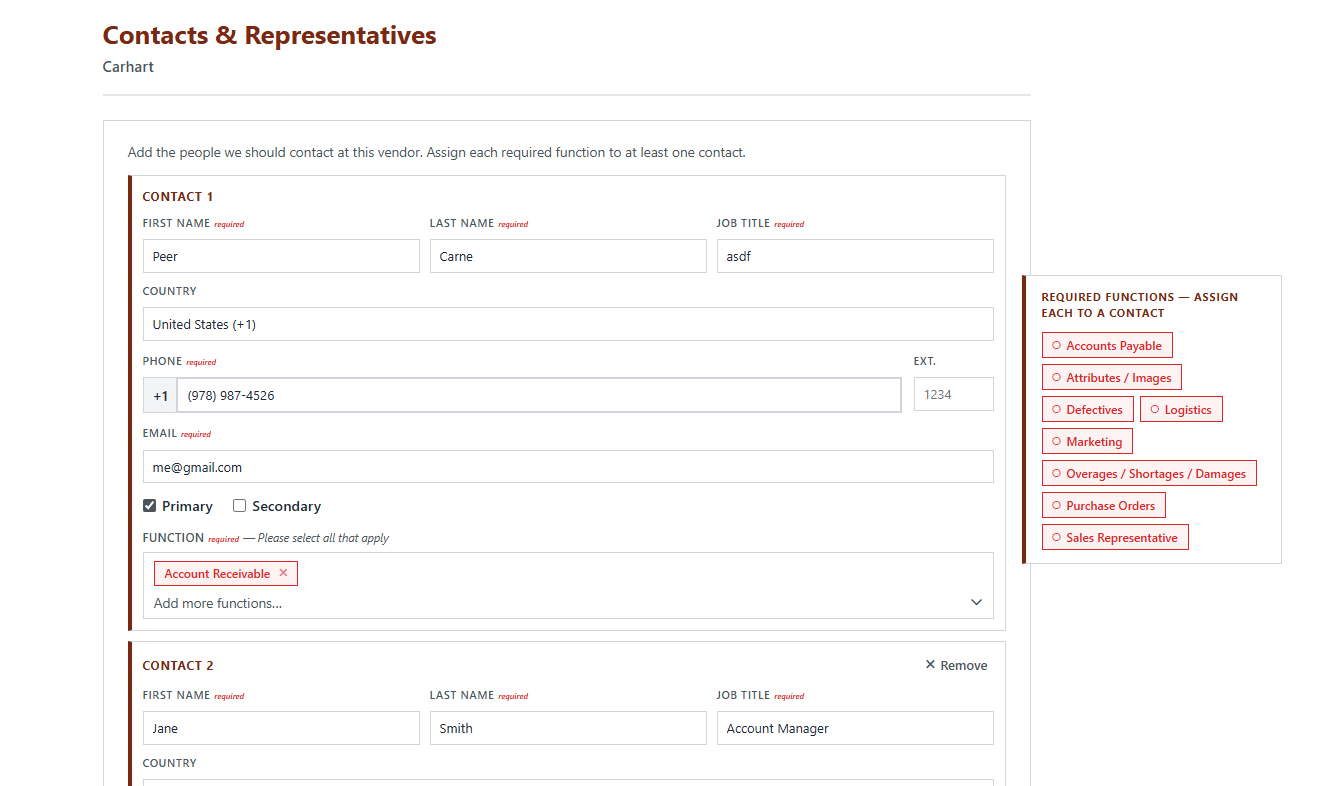
What this page does
- Stores the contact information for every person at the vendor Murdoch’s may need to contact.
- Maps business functions (for example, Accounts Payable) to specific contacts so notifications go to the right person.
- Feeds the Primary Contact field on the Vendor Details Overview header.
Per-contact field reference
Required functions
Every function on the right-hand panel must be assigned to at least one contact before the page can be saved. Available functions:- Accounts Payable
- Attributes / Images
- Defectives
- Logistics
- Marketing
- Overages / Shortages / Damages
- Purchase Orders
- Sales Representative
A single contact can hold multiple functions. Assign all functions to the same person if the vendor is small — Murdoch’s just needs to know who to email.
Common issues
- Save is disabled. One or more required functions is unassigned. Look at the right-hand panel — every tag must be colored / filled.
- Vendor is not receiving PPL notifications. The Purchase Orders or Attributes / Images function is not assigned to a contact with a valid email.
- Two people are marked Primary. Only one Primary is allowed. Uncheck the extra one.